大部份的遊戲都會有陣營的設計
從簡單的敵/我兩方,到加入NPC,加入中立單位、第三勢力等。

綠:打不到對方
黃:不主動攻擊,被打會還擊
紅:主動攻擊
一步一步介紹一下那個紅框框裡的東西要怎麼畫
假設現在有四個陣營[Player, Enemy, NPC, Object]
主要分三個區塊
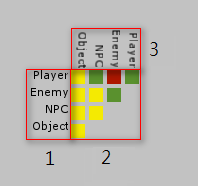
3跟1其實是一樣的東西,但以2為中心點順時間旋轉90
所以我們只要把1畫出來,剩下的事就會輕鬆許多
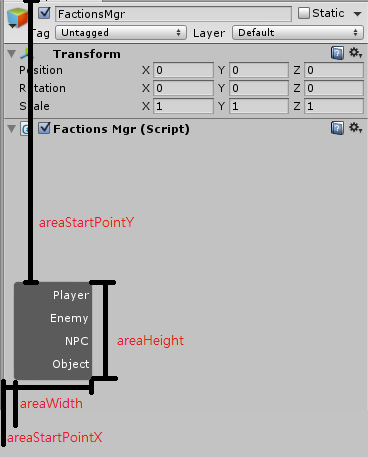
注意到label是向右靠齊,所以必需要用一個Area包起來,不然會靠到最右邊
 string[] factions = new string[] { "Player", "Enemy", "NPC", "Object" };
 int factionsSize = factions.Length;

 float areaStartPointX = 10;
 float areaStartPointY = 280;
 float areaWidth = 80;
 float areaHeight = factionsSize * 25;

 Rect areaRect = new Rect(areaStartPointX, areaStartPointY, areaWidth, areaHeight);
 GUILayout.BeginArea(areaRect, mySkin.textArea);
 for (int i = 0; i < factionsSize; ++i)
 {
 EditorGUILayout.LabelField(factions[i], mySkin.label);
 }
 GUILayout.EndArea();
其中有用到一個自己的GUISkin,主要是做向右對齊,
areaStartPointY留長一點,要給上面的Label空間,
這邊是寫死280,但可以依字的長度去變化,但要避免太短
然後以右邊的區塊為中心點轉90度
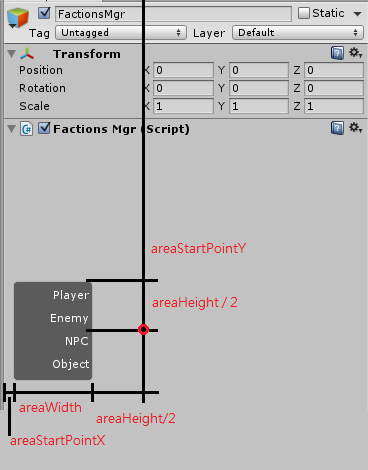
旋轉點.y = areaStartPointY + areaHeight / 2
旋轉點.x = areaStartPointX + areaWidth + areaHeight / 2
利用 GUIUtility.RotateAroundPivot() 就可以將之後畫出來的東西旋轉
 //旋轉中心
 Vector2 rotatePoint = new Vector2();
 rotatePoint.x = areaStartPointX + areaWidth + areaHeight * 0.5f;
 rotatePoint.y = areaStartPointY + areaHeight * 0.5f;

 //畫上面的Label
 GUIUtility.RotateAroundPivot(90, rotatePoint); //旋轉90度
 Rect areaRect = new Rect(areaStartPointX, areaStartPointY, areaWidth, areaHeight);
 GUILayout.BeginArea(areaRect, mySkin.textArea);
 for (int i = 0; i < factionsSize; ++i)
 {
 EditorGUILayout.LabelField(factions[i], mySkin.label);
 }
 GUILayout.EndArea();
 GUIUtility.RotateAroundPivot(-90, rotatePoint); //轉回來之後的東西才會正常
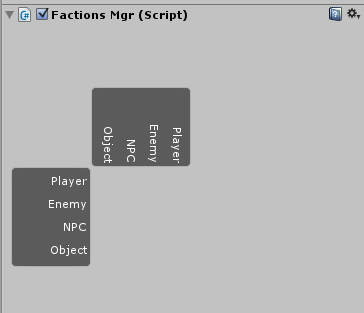
接下只要把中間用Button或Toggle填滿就行了
(第一張的範例是用帶Image的Button填滿)

附上範例碼
using System.Collections;
using UnityEditor;
using UnityEngine;

[CustomEditor(typeof(FactionsMgr))]
public class FactionsMgrEditor : Editor
{
 GUISkin mySkin = null;

 void OnEnable()
 {
 if (mySkin == null)
 mySkin = Resources.LoadAssetAtPath("Assets/Editor/Resource/mySkin.guiskin");
 }

 public override void OnInspectorGUI()
 {
 string[] factions = new string[] { "Player", "Enemy", "NPC", "Object" };
 int factionsSize = factions.Length;

 //Area的大小
 float areaStartPointX = 10;
 float areaStartPointY = 280;
 float areaWidth = 80;
 float areaHeight = factionsSize * 25;

 //旋轉中心
 Vector2 rotatePoint = new Vector2();
 rotatePoint.x = areaStartPointX + areaWidth + areaHeight * 0.5f;
 rotatePoint.y = areaStartPointY + areaHeight * 0.5f;

 //畫上面的Label
 GUIUtility.RotateAroundPivot(90, rotatePoint); //旋轉90度
 Rect areaRect = new Rect(areaStartPointX, areaStartPointY, areaWidth, areaHeight);
 GUILayout.BeginArea(areaRect, mySkin.textArea);
 for (int i = 0; i < factionsSize; ++i)
 {
 EditorGUILayout.LabelField(factions[i], mySkin.label);
 }
 GUILayout.EndArea();
 GUIUtility.RotateAroundPivot(-90, rotatePoint); //轉回來之後的東西才會正常

 //畫側邊的Label
 GUILayout.BeginArea(areaRect, mySkin.textArea);
 for (int i = 0; i < factionsSize; ++i)
 {
 EditorGUILayout.LabelField(factions[i], mySkin.label);
 }
 GUILayout.EndArea();

 //填滿中間
 float buttonWidth = areaRect.height / (float)factionsSize;
 float buttonHeight = areaRect.height / (float)factionsSize;
 float startPosX = areaRect.x + areaRect.width;
 float startPosY = areaRect.y;

 for (int i = 0; i < factionsSize; ++i)
 {
 for (int j = i; j < factionsSize; ++j)
 {
 bool click = GUI.Button(new Rect(startPosX + buttonWidth * (size - j - 1), startPosY + buttonHeight * i, buttonWidth, buttonHeight)
 ,"", mySkin.button);
 if (click)
 {
 //改變陣營關系
 }
 }
 }

 GUILayout.FlexibleSpace();
 }
}
文章標籤
全站熱搜
